Attachments in Jason Sequences – Give Prospects a Reason to Engage
Most outreach asks for attention before it earns it.
You reach out, you make your case, you ask for a meeting. But the prospect doesn’t know you yet, doesn’t trust you yet, and has no reason to prioritize your message over everything else competing for their time.
That’s a hard position to win from. Especially when your product is complex, your deal size is significant, or your category requires some explaining before the value is obvious.
Sharing something valuable early changes that dynamic.
Now you can add attachments and lead magnets directly into Jason AI SDR sequences. Case studies, one-pagers, reports, ROI calculators, product guides – whatever gives a prospect the context they need to take your message seriously. The right content goes out at the right step automatically, across email and LinkedIn, without any manual follow-up required.
The timing matters as much as the content. A case study from a company the prospect recognizes, sent with the first email, does more than the same case study sent after two follow-ups. A report that validates the problem you’re solving, attached to a LinkedIn message, gives someone a reason to connect even if they weren’t ready to respond. You’re not waiting for someone to ask for more information. You’re providing it at the moment it would be most useful.
Multiple attachments can be added to the same Playbook, and Jason distributes them across the steps you configure. You set it up once, and every prospect who enters that sequence gets the right material at the right time – consistently, without anyone having to remember to send it.
For teams selling products that need explaining, or where trust takes time to build, this is where sequences stop feeling like templates and start feeling like conversations worth having.
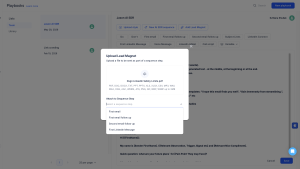
How it works: you open a Playbook, upload the file you want to include – a case study, a report, a one-pager – and assign it to a specific step in the sequence. When Jason runs that step, the attachment goes out with the message automatically. You can add multiple files to the same Playbook and assign different materials to different steps, so the right content reaches each prospect at exactly the right moment in the conversation.